 button or type CTRL+P to bring up the "Print/Preview Reports" dialog.
|
|
Power To-Do List can create somewhere in the neighborhood of a bajillion reports.
Click on the button or type CTRL+P to bring up the "Print/Preview Reports" dialog.
Select the printer that you're going to print your report on.
A list of report types is on the left under "Report List". When you select one of the reports from the list, a bunch of options pop up on the left side of the dialog. Use these options to craft your report exactly like you want it.

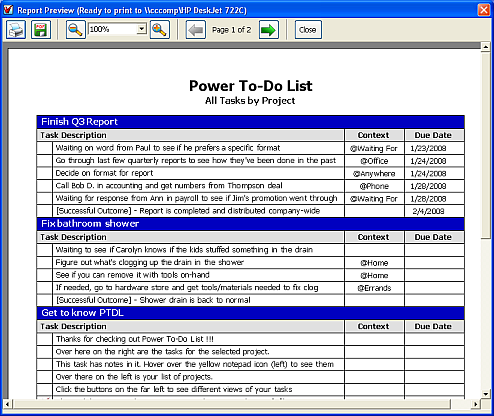
When you're ready to preview your report, click the "Preview/Print" button and a preview of the report you just created will pop up.
|
Click the Print button to print your report. |
 |
Click the "PDF" button to create an Adobe PDF document from your report. |
 |
Use these buttons (or this drop-down box) to enlarge or shrink your report in the preview screen. |
 |
Use these buttons to view the different pages in your report. |
 |
Use this button to close the Print Preview window. |